Ecommerce SEO Agency vs Doing It Yourself: How UK Online Stores Should Decide
 By Priotum Dhar
·
· 9 min read
Most UK online stores reach a point where organic traffic stalls. Paid ads are getting more expensive, the product range has grown, and someone suggests “getting an SEO agency in”. Before you sign anything, it helps to know which parts of ecommerce SEO your platform already does for you, which parts you can do in an afternoon a week, and which parts really do need a specialist.
This guide is for owners of Shopify and WooCommerce stores with anything from 30 to a few thousand products. It is deliberately honest about when you do not need an agency at all.
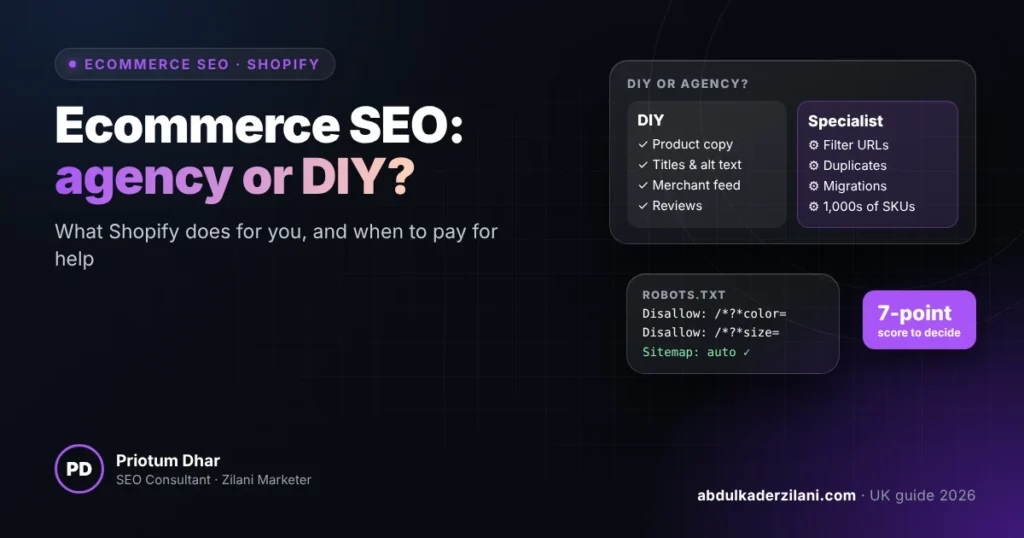
If you have under a few hundred products on Shopify and a clean theme, you can do most ecommerce SEO yourself: unique product and collection copy, good titles, product feeds and reviews. Bring in an agency or specialist when you have technical problems (faceted navigation, duplicate URLs, migrations), thousands of SKUs, or no time. Judge any agency on the specific technical and content work it will deliver, not on promised rankings.
What Shopify and WooCommerce already do for ecommerce SEO
A lot of SEO “work” in proposals is already handled by the platform. Shopify’s help centre says auto-generated canonical tags are added to pages, and that sitemap.xml and robots.txt files are generated automatically. Themes also generate title tags that include your store name, and include product structured data (Shopify Help Center).
WooCommerce runs on WordPress, so more depends on your theme and plugins. Most stores use an SEO plugin to handle sitemaps, titles and schema. The trade-off is flexibility: you can change almost anything, but you can also break almost anything.
| Task | Shopify | WooCommerce | Who should own it |
|---|---|---|---|
| XML sitemap | Automatic | Usually via SEO plugin | Platform |
| Canonical tags | Automatic | Plugin or theme | Platform, then check |
| robots.txt | Automatic, editable via template | Editable | Platform, change with care |
| Product structured data | Theme dependent | Plugin or theme | Check once, then platform |
| Product and collection copy | You | You | You |
| Image alt text | You | You | You |
| 301 redirects for removed products | You | You or plugin | You |
| Faceted navigation and filters | Theme and apps | Plugins | Specialist if large |
| Site migration | Specialist | Specialist | Specialist |
Shopify also notes that if you customise robots.txt through the template, it is an unsupported customisation and their support team cannot help with edits (Shopify Help Center). That is a good example of where a small change can have a big effect, and where expert help is worth paying for.
Ecommerce SEO you can do yourself (the DIY list)
Google’s own advice is encouraging here. Its “Do you need an SEO?” page says “If you run a small local business, you can probably do much of the work yourself” (Google Search Central), and the same is true for many small online stores. For an online store, the DIY list looks like this.
Product and collection pages
Write unique descriptions for your top-selling products, not the manufacturer’s copy that 40 other UK retailers also use. Collection pages (Shopify) or category pages (WooCommerce) are often your best ranking pages, so give each one a short, useful introduction: who the range is for, sizes, materials and delivery.
Titles, URLs and images
Use the product name and the main attribute people search for in the title tag. Keep URLs short. Add descriptive alt text to images. When you discontinue a product, Shopify recommends setting up a 301 redirect rather than leaving a dead page (Shopify Help Center).
Share your product data with Google
Google’s ecommerce guidance recommends sharing product data with Google directly, as well as through structured data on the page (Google Search Central). The simplest way is a Merchant Center feed. Free listings let products appear across Google, including Search, Images, Lens, YouTube and the Shopping tab, at no cost (Google Merchant Center Help). On Shopify, the Google and YouTube app handles most of the feed.
Shipping and returns
Google’s product structured data documentation describes merchant listings, which can show shipping details and return policy information, and suggests you “share shipping costs, especially free shipping” (Google Search Central). UK shoppers check delivery and returns before they buy, so make sure the information is on the page and in your feed.
Reviews
Product reviews help shoppers and give Google more unique content. Use a lawful review process: in the UK, fake reviews and undisclosed incentivised reviews have been banned since 6 April 2025 under the DMCC Act 2024.
Where an ecommerce SEO agency earns its fee
The jobs below are where store owners most often get stuck, and where mistakes cost real revenue.
| Problem | Why it is hard | Sign you need help |
|---|---|---|
| Faceted navigation (filters for size, colour, price) | Filters can create a near-infinite number of URLs that waste Google’s crawling | Search Console shows thousands of “Crawled, currently not indexed” filter URLs |
| Duplicate product URLs | Variants and collection paths can create several URLs for one product | The same product appears under different URLs in search |
| Site migration or replatforming | Every old URL needs a redirect and every template needs checking | You are moving from WooCommerce to Shopify, or changing domain |
| Thousands of SKUs | Copy, titles and internal links need templates and rules, not hand edits | You cannot keep up with new products |
| Speed and Core Web Vitals | Apps, scripts and large images slow pages | Mobile pages feel slow and conversion drops |
| International stores | Currency, language and hreflang | You sell into the EU or US from a UK store |
Google’s documentation on faceted navigation explains the risk clearly: filter URLs can create an effectively infinite URL space, which leads to overcrawling and slower discovery of the pages you care about. Its recommended fixes include blocking unneeded filter URLs in robots.txt, using a consistent parameter order, and returning a 404 when a filter combination has no results (Google Search Central). Getting this wrong can block pages you need, which is why it is worth an expert’s time.
Ecommerce SEO agency vs DIY: a simple scoring test
Score your store on each line. One point for “yes”.
- You have more than 500 products or variants.
- You use filters that create new URLs.
- You are planning a migration or redesign in the next 12 months.
- Search Console shows indexing problems you do not understand.
- Nobody in the business has four hours a week for SEO.
- Organic revenue has fallen for three months or more without an obvious cause.
- You sell in more than one country or currency.
0 to 2 points: do it yourself. Use the DIY list above and review it each quarter.
3 to 4 points: pay for a one-off technical audit and a written plan, then do the content work in-house.
5 or more points: an ongoing ecommerce SEO service is likely worth it, provided the scope is clear.
This is our own rule of thumb, not an industry standard. It is meant to stop you paying monthly fees for work your platform already does.
What to ask an ecommerce SEO agency
Google suggests asking any SEO provider whether they follow Google Search Essentials, whether they will share all the changes they make to your site, and what results they expect in what timeframe (Google Search Central). For an online store, add these.
- Which platform do you work on most, Shopify or WooCommerce, and can you show live examples?
- How will you handle filters and variant URLs on my store?
- Will you write product and collection copy, or only advise?
- How do you measure success: organic revenue, not just traffic or rankings?
- What happens to redirects and content if we stop working together?
- How many hours a month does the fee cover?
Google also warns: “No one can guarantee a #1 ranking on Google.” Treat any guarantee as a red flag.
Comparing the costs
We will not quote other agencies’ price lists here. Instead, compare options on time and risk.
| Option | Your time each month | Typical scope | Main risk |
|---|---|---|---|
| DIY | 10 to 20 hours | Copy, titles, feeds, reviews | Technical issues missed |
| One-off audit plus DIY | 5 to 15 hours after the audit | Fix list, priorities, templates | Plan never gets implemented |
| Freelance specialist | 2 to 4 hours of your input | Technical plus some content | Capacity and holiday cover |
| Agency retainer | 2 to 4 hours of your input | Technical, content, reporting | Paying for generic tasks |
The time estimates are examples from our own planning, not survey figures. If you want to see how a freelancer compares with an agency in more detail, read our guide to the freelance SEO consultant option. For our own fees and how we scope work, see our terms of engagement.
Do not forget paid traffic
SEO and paid ads work best together for stores. Organic search takes months, while Shopping and Meta ads can test which products and messages sell in weeks. Our Meta ads for UK ecommerce guide and break-even ROAS calculator guide help you decide how much you can afford to pay for a sale while SEO builds. And if AI search is on your mind, our piece on Google AI Overviews explains how they affect clicks.
Frequently asked questions
Do I need an ecommerce SEO agency for a Shopify store?
Not always. Shopify handles sitemaps, canonical tags and robots.txt automatically. If you have a modest catalogue and no filter or migration problems, you can do most of the work yourself and only bring in help for an audit.
What does an ecommerce SEO agency actually do?
A good one fixes technical issues such as filter URLs and duplicates, improves product and collection page templates and copy, manages redirects, works on site speed and reports on organic revenue. Ask for a written list of monthly deliverables.
Is WooCommerce or Shopify better for SEO?
Both can rank well. Shopify does more automatically and is harder to break. WooCommerce gives more control but depends on your theme, plugins and hosting, so it needs more maintenance.
How long does ecommerce SEO take to show results?
Technical fixes can show in Search Console within weeks. Ranking and revenue gains usually build over several months. Google advises asking any provider what results they expect and in what timeframe.
Should I write my own product descriptions?
Yes, at least for your best sellers and main collections. Manufacturer descriptions are shared by many retailers, so unique copy gives Google and shoppers a reason to choose your page.
Are Google free listings worth setting up?
Yes. They cost nothing and can show your products across Google, including the Shopping tab, Images and YouTube. You need a Merchant Center account and a product feed.
The bottom line
Many UK online stores pay for ecommerce SEO work their platform already does, while the real problems (filters, duplicates, migrations) go unfixed. Start with what you can do yourself, pay for a technical audit when the scoring test says so, and only move to a retainer when the scope is specific. If you want a second opinion on your store, see our ecommerce marketing service and SEO service, or book a strategy call.
Sources
- Shopify Help Center: SEO overview
- Shopify Help Center: Editing robots.txt
- Google Search Central: Best practices for ecommerce sites
- Google Search Central: Product structured data
- Google Search Central: Managing crawling of faceted navigation URLs
- Google Search Central: Do you need an SEO?
- Google Merchant Center Help: Free listings for products
- legislation.gov.uk: Digital Markets, Competition and Consumers Act 2024