Google Ads Management in the UK: Fees, What’s Included, and How to Audit Your Account
 By Abdur Rahman
·
· 10 min read
Most UK business owners who pay someone to run Google Ads have never looked inside the account themselves. They see a monthly invoice, a PDF report with a lot of green arrows, and a bank statement that says the spend went out. Whether the work behind it is good is hard to tell from the outside.
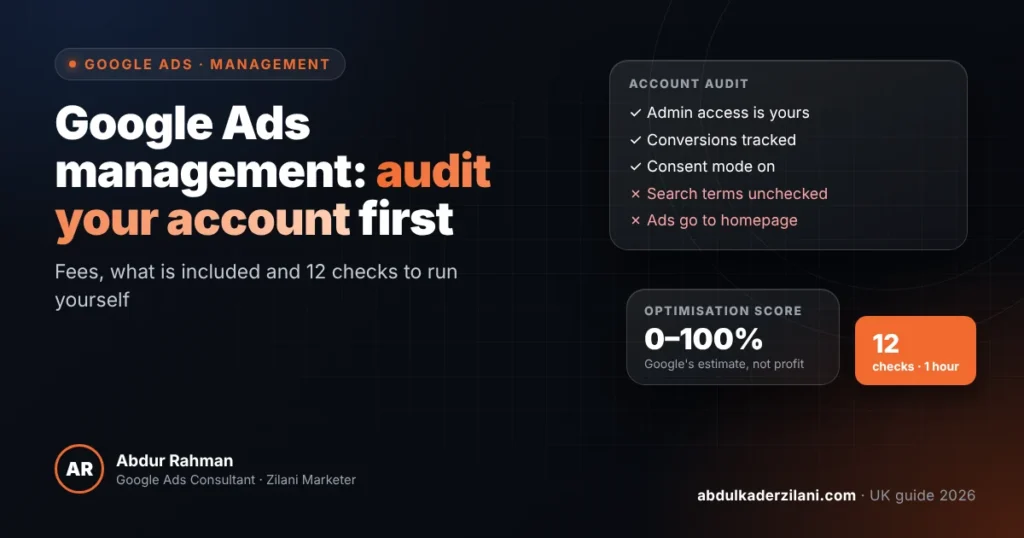
This guide fixes that. It explains what Google Ads management should actually include, how fees are usually set, and then walks you through a Google Ads account audit you can run yourself in under an hour, with nothing more than admin access and a cup of tea.
Good Google Ads management is mostly unglamorous weekly work: checking search terms, adding negatives, testing ads, fixing tracking and sending traffic to pages that convert. Fees are usually a flat monthly amount, a percentage of spend, or a mix. Before you pay anyone, make sure you own the account with admin access, that conversions are tracked properly, and that you can see the search terms report. Those three checks catch most problems.
What Google Ads management should include each month
A management fee pays for time and judgement. The useful question is not “how much?” but “what will you do every week, and how will I see it?” Here is what a competent manager does for a typical service business or small online shop.
| Task | How often | What you should be able to see |
|---|---|---|
| Review the search terms report and add negative keywords | Weekly | New negatives in the change history |
| Check budgets, pacing and bid strategy targets | Weekly | Notes on any budget or target changes |
| Test new ad copy and assets | Monthly | New ads or assets with dates |
| Check conversion tracking is still firing | Weekly | No “inactive” or “no recent conversions” warnings |
| Review landing pages and suggest fixes | Monthly | A short list of page changes, with reasons |
| Report on leads or sales and cost per result | Monthly | Cost per lead or ROAS against a target you agreed |
| Plan next month’s tests | Monthly | Two or three named tests, not “ongoing optimisation” |
If your monthly report only shows impressions, clicks and click-through rate, you are being shown activity rather than results. Clicks cost money; leads and sales make money.
Strategy versus button pushing
Google’s own tools now automate a lot of the bidding. That is not a reason to pay less attention. It moves the work towards inputs: which conversions the system optimises for, which searches you exclude, what the ads say and where people land. A manager who mostly accepts Google’s automated recommendations is not adding much that you could not do yourself.
How Google Ads management fees are usually structured
We will not quote other firms’ price lists here, because they vary widely and change often. What we can do is explain the three common fee models and what each one rewards. Our own pricing approach is set out on our terms of engagement page.
| Fee model | How it works | Good for | Watch out for |
|---|---|---|---|
| Flat monthly fee | Fixed amount for an agreed scope | Small, stable accounts | Scope creep or a shrinking amount of real work |
| Percentage of ad spend | Fee rises and falls with your budget | Accounts that are scaling | An incentive to spend more, not spend better |
| Hybrid | Flat base plus a smaller percentage above a spend level | Growing ecommerce accounts | Make sure the thresholds are written down |
| Setup fee | One-off charge for build, tracking and research | New or broken accounts | Ask exactly what is built and who owns it |
A sensible way to judge any fee is to turn it into hours. Ask the provider how many hours a month your account gets and what those hours are spent on. A single-location trade business with one or two Search campaigns needs far less time than a shop with hundreds of products, Shopping feeds and several markets.
Costs on top of the management fee
Remember the costs that sit outside the fee. Google adds a 2% surcharge to ads served in the UK, in place since 1 November 2020. If you are VAT registered, you account for VAT on Google Ads through the reverse charge; if you are not, you pay 20% VAT on top. Our Google Ads cost guide covers these in more detail.
Click prices also vary hugely by sector. These are the top-of-page bid ranges from Google Keyword Planner for a few UK searches:
| Search term | Top-of-page bid range | UK searches a month |
|---|---|---|
| personal injury solicitor | £16.99 to £50.87 | 1,900 |
| emergency plumber | £5.39 to £28.07 | 9,900 |
| locksmith near me | £5.06 to £21.19 | 74,000 |
| accountant near me | £3.91 to £13.94 | 12,100 |
| dentist near me | £1.46 to £5.76 | 246,000 |
Source: Google Keyword Planner, United Kingdom, last 12 months, checked 15 November 2026. A management fee that looks fine for a dentist could be far too small for the amount of careful work a solicitor’s account needs at those click prices.
How to run a Google Ads account audit yourself
You do not need to be an expert to run a basic Google Ads account audit. You need admin access and about an hour. Work through the checks below in order, because the early ones affect everything that follows.
Check 1 to 3: ownership and access
- Who owns the account? Go to Admin, then Access and security. Google Ads has several access levels: email only, billing, read only, standard and admin. Only admin users can give access, change access levels and unlink manager accounts. Your business should have at least one admin login that belongs to you, not to the agency.
- Is there more than one admin? Google itself warns that if an account has only one administrator, you may lose access to your tags if that person becomes unavailable.
- Which manager accounts are linked? If an agency’s manager account has ownership, its admins can edit user access in your account. That is normal while you work together, but you should know about it and be able to remove it.
Check 4 to 6: conversion tracking
- What counts as a conversion? Open Goals and look at the conversion actions marked as primary. A form submission, a call over a set length or a purchase are real outcomes. Page views and button clicks usually are not.
- Is tracking still working? Look for status warnings such as “no recent conversions”. A tag that broke during a website update can quietly waste months of budget.
- Is consent handled? Google’s EU user consent policy applies to users in the UK as well as the EEA. You must get valid consent for ad cookies and personalisation, keep records of it and let people withdraw it. If your site has no proper consent banner connected to Google’s consent mode, your measurement and remarketing are on shaky ground.
If tracking is broken, stop here and fix it first. Everything else in the account depends on it, as we explain in our guide to break-even ROAS.
Check 7 to 9: where the money goes
- Read the search terms report. In Campaigns, open Insights and reports, then Search terms. This shows the real searches that triggered your ads. If you see job seekers, DIY questions, competitors’ names you did not choose or towns you do not cover, someone is not adding negatives.
- Check Performance Max too. Performance Max campaigns now have their own “Search terms and landing pages” view inside the search terms report, with data available from March 2023 onwards. Google advises judging these campaigns on conversion data rather than clicks and impressions.
- Look at location settings. Make sure ads target people in or regularly in your area, not just people “interested in” it, unless you have a good reason.
Check 10 to 12: ads, pages and recommendations
- Quality Score components. Add the Quality Score columns at keyword level. Google describes Quality Score as a diagnostic, scored 1 to 10, built from expected click-through rate, ad relevance and landing page experience. It is not an input in the ad auction and should not be treated as a KPI, but “below average” landing page experience is a useful warning sign.
- Landing pages. Click your own ads. Does each one land on a page that matches the search, loads quickly on a phone and has one clear next step? If every ad goes to the homepage, that is an easy win. Our guide to Google Ads for tradespeople shows what a good service page looks like.
- Optimisation score and auto-applied recommendations. Optimisation score is Google’s estimate, from 0 to 100%, of how well the account is set to perform. It reflects Google’s recommendations, not your profit. Check which recommendations are set to auto-apply, and make sure nothing that expands targeting or raises budgets is applying without a human decision.
What to do with your Google Ads account audit findings
Most audits turn up the same handful of problems. Here is how to prioritise them.
| Finding | Risk | What to do first |
|---|---|---|
| You do not have admin access | Very high | Ask for admin access in writing this week |
| Conversion tracking broken or counting the wrong thing | Very high | Pause expansion, fix tracking, then review results |
| Irrelevant search terms taking a large share of spend | High | Add negatives and tighten match types |
| Every ad lands on the homepage | Medium | Build one focused page per main service |
| Recommendations auto-applying without review | Medium | Switch off the ones that change budget or targeting |
| No ad tests in months | Low to medium | Agree a simple monthly testing plan |
When you raise these with your provider, ask for a dated plan rather than an apology. A good manager will welcome an informed client. A weak one will tell you the account is “in learning” for the third month running.
Google Ads account audit questions to ask before you hire
- Will I have admin access to my own account from day one, and will I keep it if we stop working together?
- Which conversion actions will you optimise for, and how will you check they are accurate?
- How often will you review search terms, and can I see the negatives you add?
- How many hours a month does my fee cover, and what happens if I need more?
- What notice period applies, and is there any fee to leave?
- What will you need from me each month, such as lead quality feedback or stock updates?
If you are comparing providers, our guides to choosing a PPC agency and to Google Ads agencies in the UK go deeper on contracts and warning signs.
Frequently asked questions
How often should a Google Ads account be audited?
Run a light check monthly (tracking, search terms, budgets) and a fuller Google Ads account audit at least once or twice a year, or whenever results change sharply or you change website or provider.
Can I audit my Google Ads account without admin access?
You can review a lot with standard or read-only access, but you cannot see or change who has access. If you are paying for the account and do not have admin access, fix that first.
Is a percentage-of-spend fee a bad sign?
Not on its own. It suits accounts that are scaling. Just make sure the fee is tied to results you track and that there is a clear reason each time the budget goes up.
Does a high optimisation score mean my account is good?
No. Optimisation score measures how many of Google’s recommendations you have dealt with. It does not measure profit, lead quality or cost per sale.
What should a Google Ads management report show?
Leads or sales, cost per lead or return on ad spend against an agreed target, what changed this month and why, and what will be tested next. Impressions and clicks are supporting detail.
Do I pay VAT on Google Ads in the UK?
If you are VAT registered you use the reverse charge. If you are not, Google adds 20% VAT. There is also a 2% UK surcharge on ads served in the UK.
The bottom line
Google Ads management is worth paying for when it buys careful, regular work you can see: clean tracking, tight search terms, honest reporting and better landing pages. A one-hour Google Ads account audit tells you whether that is happening. If you would like a second pair of eyes, our Google Ads management service starts with exactly this kind of review, and you can book a strategy call to talk it through.
Sources
- About access levels in your Google Ads account (Google Ads Help)
- About Quality Score for search campaigns (Google Ads Help)
- About optimisation score (Google Ads Help)
- Get negative keyword ideas using the search terms report (Google Ads Help)
- About the search terms report in Performance Max (Google Ads Help)
- EU user consent policy (Google)
- Google Keyword Planner, United Kingdom, last 12 months, checked 15 November 2026