Ecommerce Web Design in the UK: What Converts, What It Costs, and What to Prioritise
 By Priotum Dhar
·
· 9 min read
Most ecommerce web design quotes look the same on the surface: a homepage mock-up, a product page, a checkout and a number at the bottom. What they hide is where the money really goes, and whether the finished store will turn visitors into orders.
This guide breaks the cost into parts you can check, shows what UK shoppers expect before they hand over card details, and gives you an order of priorities so a limited budget goes on the things that move sales.
Your ecommerce website cost has two halves: platform running costs (published, easy to check) and design and build time (quoted in hours, and where quotes differ most). Spend first on fast product pages, clear delivery and returns information, and a simple checkout. Custom design flourishes come last.
Why ecommerce web design matters more in 2026
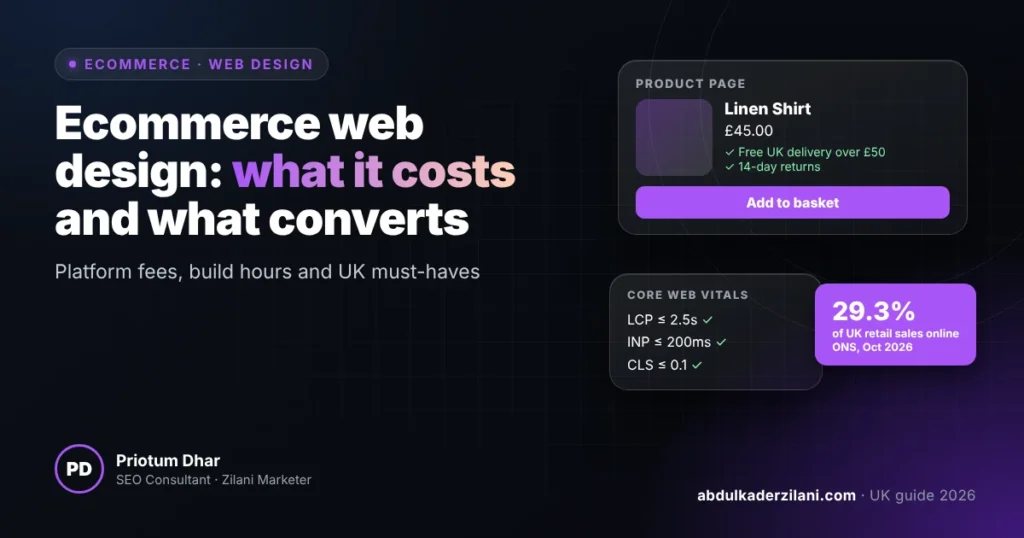
Online shopping is a big slice of UK retail, not a side channel. The Office for National Statistics series for internet sales as a share of total retail sales stood at 29.3% in October 2026. That is roughly £3 in every £10 spent in shops going through a website or app.
That share means your store is competing with large retailers who have spent years removing friction from their checkouts. Shoppers carry those expectations to your site. If delivery costs appear only at the last step, or a product page takes too long to load on mobile, they leave.
For a store that runs paid traffic, design is also an advertising cost. Every visitor you pay for through Meta ads for ecommerce or Google Shopping lands on your product page. A page that converts poorly raises the return on ad spend you need just to break even.
What an ecommerce website costs: the parts to check
Ignore the headline number on a quote for a moment. Split it into these lines and you can compare quotes properly.
| Cost line | One-off or ongoing | How to check it |
|---|---|---|
| Platform subscription | Ongoing, monthly or yearly | Published on the platform’s pricing page |
| Payment processing | Ongoing, per order | Published card rates per plan |
| Theme or design system | One-off, sometimes yearly updates | Theme store price, or design hours if custom |
| Build and setup | One-off | Quoted hours multiplied by the hourly or day rate |
| Apps, plugins, extensions | Usually ongoing | List each one with its monthly or yearly fee |
| Hosting (self-hosted stores) | Ongoing | Hosting plan price |
| Maintenance and updates | Ongoing | Monthly hours or a support plan |
Platform costs you can verify today
These are the published figures from the platforms themselves, checked in November 2026. Prices change, so confirm them on the day you decide.
| Platform | Running cost | Card processing | Notes |
|---|---|---|---|
| Shopify Basic | £25 a month billed monthly, or £19 a month billed yearly | 2% + 25p online | No extra staff accounts |
| Shopify Grow | £65 a month monthly, or £49 a month yearly | 1.7% + 25p online | 5 staff accounts |
| Shopify Advanced | £344 a month monthly, or £259 a month yearly | 1.5% + 25p online | 15 staff accounts |
| WooCommerce | Core plugin is free, with no monthly subscription | Depends on your payment provider | You pay for hosting and any paid extensions |
Two details catch people out. Shopify adds a third-party transaction fee if you take payments through another provider instead of Shopify Payments (2% on Basic, according to its pricing table), so check which payment route your quote assumes. WooCommerce’s own pricing page puts hosting for most stores at roughly $25 to $350 a month and paid extensions at $29 to $299 a year each, quoted in US dollars. “Free” software still has running costs.
Wix and Squarespace also sell ecommerce plans. Their published prices vary by location, so check the UK version of their pricing page before comparing.
Build costs: think in hours, not packages
Design and build is the part with the widest spread between quotes, because it depends on scope. Rather than compare package names, ask each supplier for an estimate in hours for each of these tasks:
- Theme setup or custom design of the homepage, collection page and product page
- Product import (how many products, how many variants, who writes the descriptions)
- Delivery zones, rates and any click-and-collect setup
- Payment setup, including express options such as Apple Pay and Google Pay
- Legal pages: terms, returns, privacy, cookies
- Tracking setup: analytics, Google Ads conversions, Meta pixel and Conversions API
- Speed work: image compression, app clean-up, testing on mobile
- Training and handover
Multiply the hours by the rate you have been quoted and you will see where the number comes from. If two quotes differ a lot, the hours list shows you why. Our own rates and how we scope work are set out in our terms of engagement.
What pushes the hours up
| Driver | Lower effort | Higher effort |
|---|---|---|
| Catalogue | Under 50 products, few variants | Thousands of products, complex variants |
| Design | Adapted theme | Fully custom design and code |
| Integrations | Payments and email only | Stock system, ERP, marketplaces, wholesale pricing |
| Content | You supply finished copy and photos | Copywriting and photography included |
| Migration | New store | Moving from another platform with redirects and order history |
Migration is the line most often underestimated. Moving an existing store means mapping old URLs to new ones so you do not lose search rankings. If organic traffic matters to you, ask exactly how redirects will be handled before you sign.
What UK shoppers need to see before they buy
Some of this is good practice. Some of it is the law.
The legal must-haves
GOV.UK’s guidance on online and distance selling says you must give customers, before they order, your business name and contact details, a description of the goods, the price including taxes, delivery arrangements and costs, and how and when they can cancel. For most goods, customers can cancel up to 14 days after their order is delivered, without giving a reason.
On cookies, the ICO’s guidance is that non-essential cookies, such as most advertising cookies, need the user’s active consent, and you cannot set them before that consent is given. Essential cookies, such as the shopping basket, do not need consent. Your designer should build the consent banner in from the start, not bolt it on later, because it affects how your tracking works.
The conversion essentials
These are the features we would fund before any decorative design work:
- Delivery costs and times on the product page. Do not make people reach the checkout to find out.
- A visible returns policy. Link it near the add-to-basket button. The 14-day legal minimum is a starting point; a clear, simple policy builds trust.
- Guest checkout. Forcing account creation before payment adds a step most first-time buyers do not want.
- Express payments. Apple Pay, Google Pay and PayPal reduce typing on mobile.
- Real product photography. Several angles, scale shots and close-ups of materials.
- Reviews you have collected properly. Fake or undisclosed incentivised reviews have been unlawful in the UK since 6 April 2025 under the Digital Markets, Competition and Consumers Act 2024.
- Fast pages on mobile. See the speed targets below.
Speed targets to put in the contract
Google’s Core Web Vitals give you objective targets you can write into a brief. Per web.dev, a page is in the “good” range when:
| Metric | What it measures | Good threshold |
|---|---|---|
| Largest Contentful Paint (LCP) | How quickly the main content appears | 2.5 seconds or less |
| Interaction to Next Paint (INP) | How quickly the page responds to taps and clicks | 200 milliseconds or less |
| Cumulative Layout Shift (CLS) | How much the layout jumps around while loading | 0.1 or less |
Ask for these to be measured on your product and collection pages, on mobile, before handover. Heavy apps, large uncompressed images and too many tracking scripts are the usual reasons stores fail them.
Shopify or WooCommerce for a UK small business?
Both work. The right choice depends on how much you want to manage yourself.
| Question | Shopify tends to suit | WooCommerce tends to suit |
|---|---|---|
| Who handles hosting and security? | You want the platform to | You are happy to own it, or have a developer who will |
| How custom is your product logic? | Standard products and variants | Unusual pricing, bookings or deep WordPress content |
| Is content marketing central? | Some blogging | A large content site already on WordPress |
| Monthly cost predictability | Fixed plan plus apps | Hosting plus extensions, more variable |
If you already run a content-heavy WordPress site, adding WooCommerce can make sense. If you are starting from scratch and want to sell quickly with less maintenance, Shopify is usually simpler. Whichever you pick, tracking needs to be right from day one. We see stores where the Meta pixel misses purchases for months, which quietly ruins ad optimisation.
A priority order for a limited budget
If the budget will not stretch to everything, spend in this order:
- Platform setup, payments and delivery rules working correctly
- Product pages: photos, clear descriptions, delivery and returns information, reviews
- Checkout: guest checkout, express payments, no surprise costs
- Tracking: analytics, ad platform conversions, consent banner
- Speed: pass Core Web Vitals on mobile for your key templates
- Collection pages and search, so people can find products
- Homepage design and brand storytelling
- Custom features and animations
The homepage sits low on this list on purpose. Most paid and search traffic lands on product and collection pages, not the homepage.
Questions to ask before you sign
- Who owns the store, the domain and the theme files once the project ends?
- Which apps or plugins will be installed, and what is each one’s monthly cost?
- How many hours are estimated for each task, and what happens if we go over?
- Will you test Core Web Vitals on mobile before handover?
- How will tracking and the cookie banner be set up and tested?
- If we are migrating, how will old URLs be redirected?
- What training and support is included after launch?
A supplier who answers these clearly and in writing is easier to work with than one who sends a single package price.
Frequently asked questions
How much does ecommerce web design cost in the UK?
It depends on scope, so compare quotes line by line. Platform costs are published (Shopify Basic is £25 a month billed monthly, or £19 billed yearly; WooCommerce is free software but needs hosting). Build cost is the quoted hours multiplied by the rate. Ask every supplier for an hours estimate per task.
Is Shopify or WooCommerce cheaper to run?
WooCommerce has no platform subscription, but you pay for hosting and often for paid extensions, so it is not automatically cheaper. Shopify has a fixed monthly fee plus app costs. Add up a full year of running costs for your actual setup before deciding.
What legal pages does a UK online shop need?
At minimum, clear terms of sale, a returns and cancellation policy covering the 14-day right to cancel for most goods, a privacy notice and a cookie policy with a consent banner for non-essential cookies. GOV.UK and the ICO publish guidance on each.
What should I prioritise if my budget is small?
Working payments and delivery, strong product pages, a simple checkout and correct tracking. Custom homepage design can wait until the store is selling.
How do I know if my store is fast enough?
Measure Google’s Core Web Vitals on mobile. Good means Largest Contentful Paint of 2.5 seconds or less, Interaction to Next Paint of 200 milliseconds or less and Cumulative Layout Shift of 0.1 or less.
Should my web designer set up tracking?
Yes, or someone should, before launch. If analytics, Google Ads conversions and the Meta pixel are not set up and tested with the cookie banner, your ad platforms will optimise on incomplete data.
The bottom line
Good ecommerce web design is less about how the homepage looks and more about whether product pages load quickly, answer delivery and returns questions, and lead to a checkout with no surprises. Get the platform costs from the source, get build costs as hours, and fund the conversion essentials first.
If you want a store built or rebuilt around these priorities, see our ecommerce website development service. For stores already trading, our guide to scaling an ecommerce brand covers what comes after launch. Or book a strategy call and we will look at your current setup with you.